Every device connected to the internet has an IP address. Whether you’re browsing websites, watching YouTube, sending emails, or playing online games, your device uses an IP address to communicate with other devices across the internet.
Think of an IP address as the digital address of your computer or smartphone. Just as your home address helps the postal service deliver mail to your house, an IP address helps data find the correct device on a network.
In this guide, you’ll learn what an IP address is, how it works, the different types of IP addresses, and how it differs from a MAC address.
What Is an IP Address?
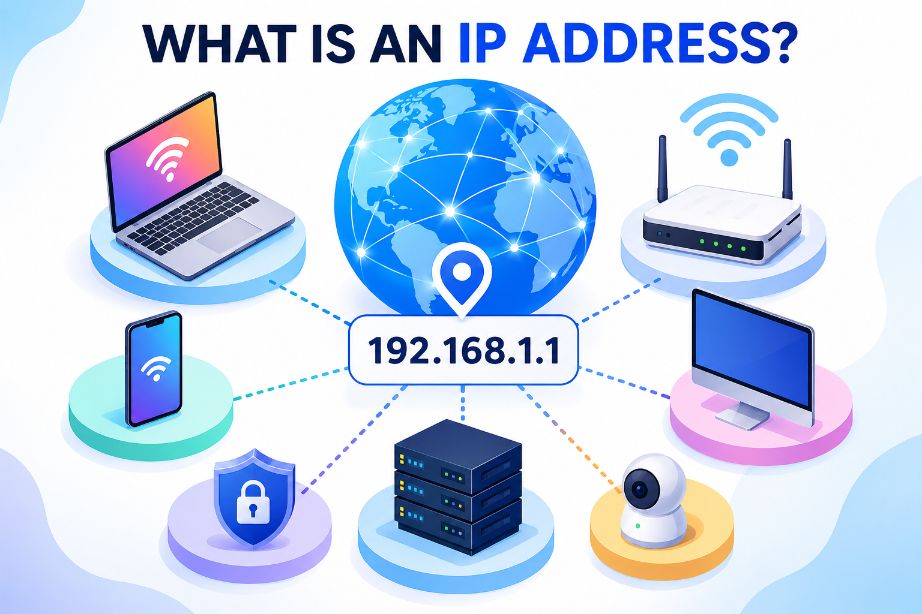
An IP (Internet Protocol) address is a unique numerical identifier assigned to every device connected to a network that uses the Internet Protocol. It allows devices to send and receive data over local networks and the internet.
Without IP addresses, computers, smartphones, servers, and other internet-connected devices wouldn’t know where to send or receive information.
Every time you visit a website, your device uses IP addresses behind the scenes to communicate with web servers.
What Does IP Stand For?
IP stands for Internet Protocol.
Internet Protocol is the set of rules that governs how data is transmitted between devices across networks. It defines how data packets are addressed, routed, and delivered to their destination.
How Does an IP Address Work?
Whenever you connect to the internet, your Internet Service Provider (ISP) or local router assigns an IP address to your device.
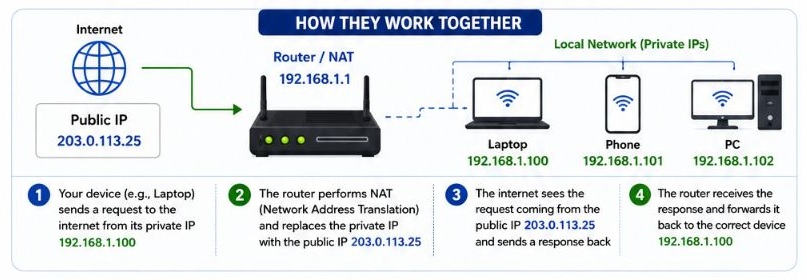
When you open a website:
- You enter a domain name like example.com.
- DNS translates the domain name into an IP address.
- Your device sends a request to that IP address.
- The web server responds by sending the requested webpage back to your device.
This entire process usually takes only a fraction of a second.
IP Address Format
There are currently two versions of IP addresses.
IPv4
IPv4 is the most widely used version.
It consists of 32 bits divided into four numbers separated by periods.
Example
192.168.1.100Each number ranges from 0 to 255.
Because IPv4 provides about 4.3 billion unique addresses, the growing number of internet-connected devices has led to the adoption of IPv6.
IPv6
IPv6 was developed to overcome the limitations of IPv4.
It uses 128 bits, allowing for an enormous number of unique addresses.
Example
2001:0db8:85a3:0000:0000:8a2e:0370:7334IPv6 also improves routing efficiency, security, and scalability for the future internet.
Types of IP Addresses
IP addresses can be categorized in several ways.
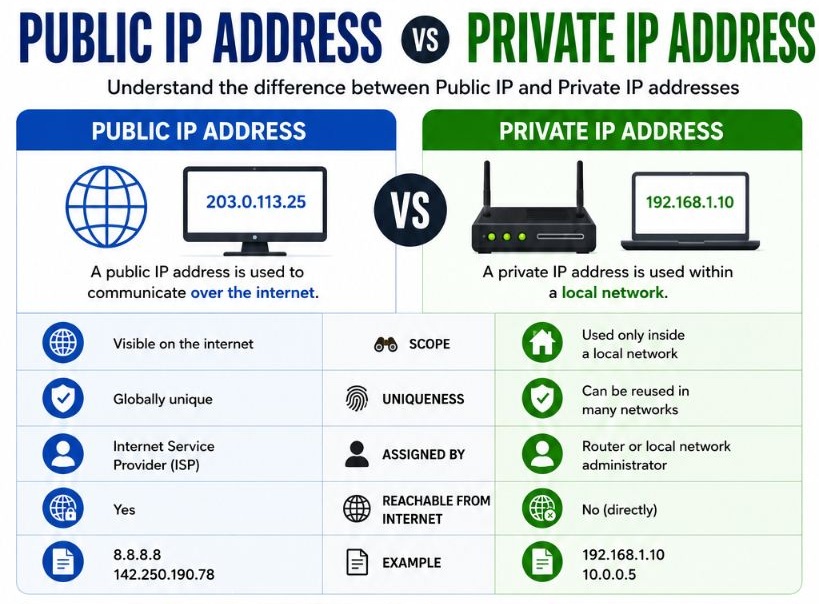
Public IP Address
A public IP address is assigned by your Internet Service Provider.
It is visible on the internet and identifies your home or business network.
Public IP addresses are required for internet communication.
Private IP Address
Private IP addresses are used inside local networks.
Your Wi-Fi router assigns private IP addresses to devices like:
- Laptops
- Smartphones
- Smart TVs
- Printers
- Gaming consoles
Common private IPv4 ranges include:
- 192.168.x.x
- 10.x.x.x
- 172.16.x.x to 172.31.x.x
Private IP addresses cannot be accessed directly from the internet.
Static IP Address
A static IP address remains the same over time.
It is commonly used for:
- Web servers
- Email servers
- Security cameras
- Business networks
- Remote access
Dynamic IP Address
Most home internet users receive dynamic IP addresses.
These addresses are automatically assigned using DHCP and may change periodically.
Dynamic IP addresses reduce administrative work and help conserve address space.
IPv4 vs IPv6
| Feature | IPv4 | IPv6 |
|---|---|---|
| Address Length | 32-bit | 128-bit |
| Example | 192.168.1.1 | 2001:db8::1 |
| Address Space | About 4.3 Billion | Almost Unlimited |
| Header | Simpler | More Efficient |
| Security | Optional | Better native support |
| Adoption | Widely Used | Increasing Worldwide |
Public IP vs Private IP
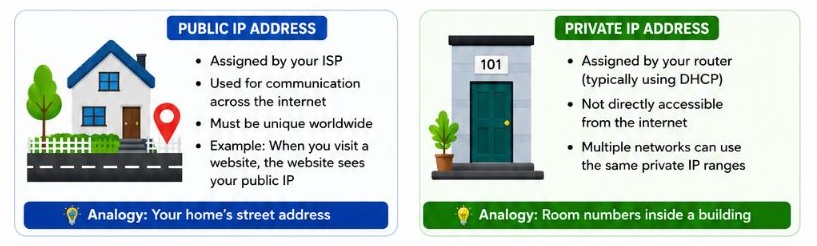
| Public IP | Private IP |
|---|---|
| Assigned by ISP | Assigned by router |
| Accessible from internet | Used only inside local network |
| Globally unique | Can be reused in different networks |
| Used for internet communication | Used within home or office networks |
IP Address vs MAC Address
Although both identify devices, they serve different purposes.
| IP Address | MAC Address |
|---|---|
| Software-based address | Hardware-based address |
| Can change | Usually remains the same |
| Used for routing across networks | Used inside local networks |
| Layer 3 (Network Layer) | Layer 2 (Data Link Layer) |
| Assigned by ISP or router | Assigned by manufacturer |
A simple way to remember the difference is:
- IP address tells where the device is.
- MAC address identifies what the device is.
Why Are IP Addresses Important?
IP addresses make internet communication possible.
They are used for:
- Browsing websites
- Sending emails
- Video streaming
- Online gaming
- Cloud computing
- Video conferencing
- Remote work
- File transfers
Without IP addresses, internet traffic could not reach the correct destination.
How to Find Your IP Address
On Windows
- Press Win + R.
- Type cmd.
- Press Enter.
- Run:
ipconfigYour IPv4 address appears under your active network adapter.
On macOS
- Open System Settings.
- Select Network.
- Click your active connection.
- Your IP address is displayed in the network details.
On Android
- Open Settings.
- Tap Network & Internet or Wi-Fi.
- Select the connected network.
- View the IP address under network information.
On iPhone
- Open Settings.
- Tap Wi-Fi.
- Tap the ⓘ icon next to your connected network.
- Your IP address is listed under IPv4 Address.
Can an IP Address Change?
Yes.
Most home internet connections use dynamic IP addresses, which can change when:
- You restart your router.
- Your ISP renews the DHCP lease.
- You change internet providers.
- You connect to a different Wi-Fi network.
Static IP addresses remain the same until manually changed.
Is It Safe to Share Your IP Address?
Your IP address is not a password, but it does reveal limited information such as your approximate geographic location and Internet Service Provider.
While simply knowing your IP address usually isn’t enough to compromise your device, it’s still good practice not to share it publicly unless necessary.
To improve privacy:
- Keep your firewall enabled.
- Update your operating system regularly.
- Use strong passwords.
- Consider using a trusted VPN when appropriate.
Common Misconceptions About IP Addresses
Every device has the same IP address.
No. Every device on a network has its own private IP address. Your router typically has one public IP address shared by devices using Network Address Translation (NAT).
IP addresses never change.
Dynamic IP addresses can change regularly.
An IP address reveals your exact home address.
No. It usually identifies your approximate location or your ISP’s service area, not your precise street address.
IPv6 has replaced IPv4 completely.
No. Both IPv4 and IPv6 are widely used today, and many networks support both.
Frequently Asked Questions
What is an IP address used for?
An IP address identifies a device on a network and enables data to be sent to the correct destination.
Can two devices have the same IP address?
On the same local network, each device should have a unique IP address. Duplicate IP addresses can cause network connectivity issues.
What is the difference between IPv4 and IPv6?
IPv6 uses 128-bit addresses, providing vastly more unique addresses than IPv4 and offering improved efficiency for modern networks.
Is an IP address permanent?
Not always. Most residential internet connections use dynamic IP addresses that can change over time, while businesses often use static IP addresses for servers and remote access.
Final Thoughts
An IP address is one of the fundamental building blocks of modern networking. It allows devices to identify each other and exchange data across local networks and the internet. Whether you’re browsing websites, streaming videos, sending emails, or connecting to cloud services, your IP address works behind the scenes to ensure information reaches the right destination.
Understanding the basics of IP addresses, IPv4 and IPv6, public and private addresses, and how they differ from MAC addresses will help you build a stronger foundation in computer networking and make troubleshooting network issues much easier.
Suggestions
- Windows DiskPart Commands Explained
- Types of Computer Ports
- Common Network Port Numbers Explained
- Wi-Fi Generations Explained: From Wi-Fi 0 to Wi-Fi 8
- Which Operating System Should You Choose?
- Error Code 0x0000001A Explained
- What Is Cache Memory?
- Must-Know Windows Repair Commands Every User Should Learn