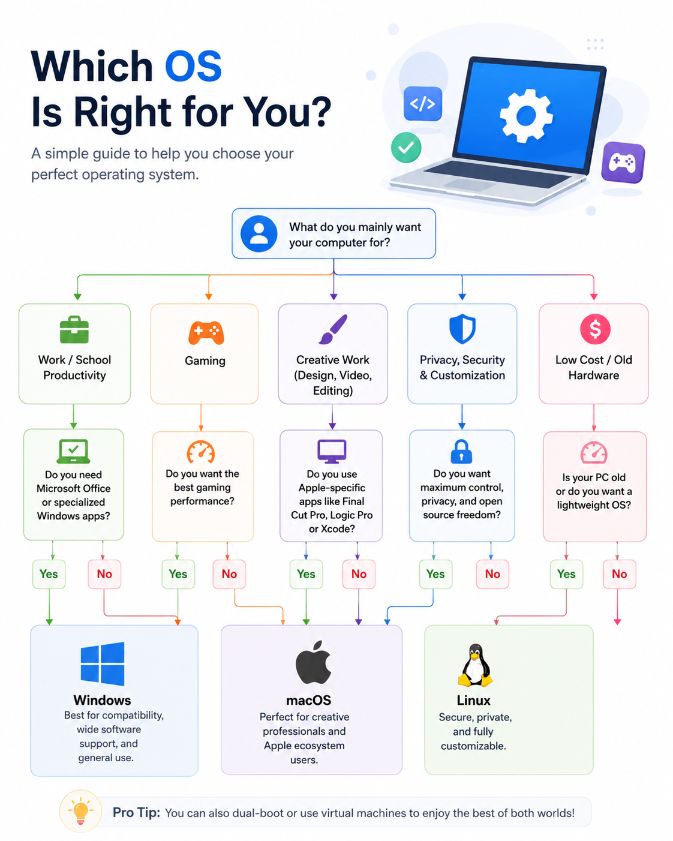
If you’ve spent time on the internet, you’ve probably come across funny charts that claim choosing an operating system is easy. One of the most popular jokes asks a series of humorous questions before recommending Windows, macOS, Linux, or ChromeOS.
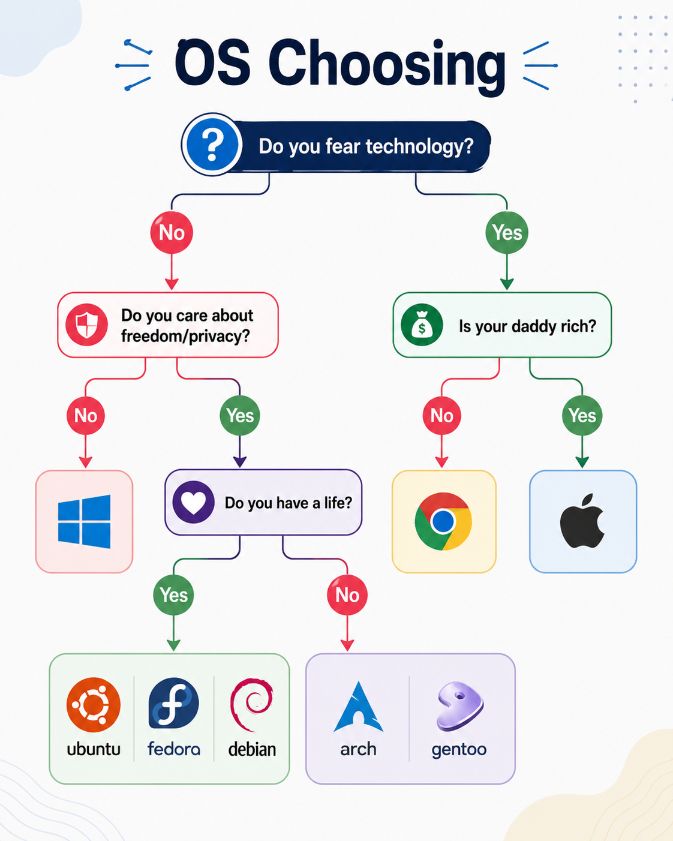
While these memes are entertaining, they don’t tell the whole story.
The truth is that there’s no single “best” operating system. The right choice depends on what you use your computer for, your budget, the software you need, and how comfortable you are with technology.
In this guide, we’ll look at the strengths and weaknesses of the most popular operating systems to help you decide which one is right for you.
What Is an Operating System?
An Operating System (OS) is the software that manages your computer’s hardware and allows you to run applications.
Without an operating system, your computer wouldn’t know how to display graphics, connect to the internet, manage files, or communicate with devices like printers and keyboards.
Today, the most popular desktop operating systems are:
- Windows
- macOS
- Linux
- ChromeOS
Each one has its own advantages and is designed for different types of users.
Windows
Windows is the world’s most widely used desktop operating system. It powers millions of laptops and desktop computers used in homes, schools, and businesses.
One of its biggest advantages is compatibility. Almost every major software developer releases Windows versions of their applications. Whether you need Microsoft Office, Adobe Photoshop, AutoCAD, or the latest PC games, Windows usually offers the broadest support.
Another advantage is hardware compatibility. Windows runs on computers from many different manufacturers, giving buyers a wide range of choices at different price points.
Best for
- Home users
- Students
- Office work
- Gamers
- Professionals
- General-purpose computing
Pros
- Huge software library
- Excellent gaming support
- Works with most hardware
- Easy to learn
- Large community support
Cons
- More frequently targeted by malware
- Requires regular updates
- Some privacy settings may need adjustment
macOS
macOS is Apple’s operating system for Mac computers.

It is known for its clean interface, smooth performance, and close integration with Apple’s ecosystem. If you already use an iPhone, iPad, Apple Watch, or AirPods, using a Mac often feels seamless.
Creative professionals also appreciate macOS because of its stability and strong support for video editing, music production, and graphic design.
Since Apple designs both the hardware and software, Macs are generally well optimized.
Best for
- Creative professionals
- Students
- Business users
- Apple ecosystem users
Pros
- Stable performance
- Excellent battery life
- Strong security features
- Easy integration with Apple devices
- Clean user experience
Cons
- More expensive hardware
- Limited upgrade options
- Smaller gaming library than Windows
Linux
Linux is different from Windows and macOS because it is open source.

Instead of one single version, Linux comes in many distributions such as Ubuntu, Fedora, Debian, Linux Mint, Arch Linux, and others.
Linux is known for being highly customizable. Users can choose different desktop environments, software packages, and system configurations.
Many servers, supercomputers, and cloud platforms run Linux because of its stability and security.
Although Linux has become easier to use over the years, some software and games are still primarily designed for Windows.
Best for
- Developers
- Programmers
- Cybersecurity professionals
- Server administrators
- Privacy-conscious users
Pros
- Free to use
- Highly customizable
- Excellent security
- Fast performance
- Huge open-source community
Cons
- Some commercial software isn’t available
- Certain hardware may require additional setup
- Learning curve for beginners
ChromeOS
ChromeOS is Google’s lightweight operating system used mainly on Chromebooks.
Unlike traditional operating systems, ChromeOS is built around the Chrome browser and cloud services.
It starts quickly, updates automatically, and requires very little maintenance.
Most modern Chromebooks can also run Android apps, making them more versatile than earlier models.
ChromeOS is ideal for users who spend most of their time browsing the web, watching videos, attending online classes, or working with Google Docs.
Best for
- Students
- Casual users
- Web browsing
- Online learning
Pros
- Fast startup
- Easy to use
- Automatic updates
- Strong security
- Affordable devices
Cons
- Limited offline capabilities
- Not suitable for advanced professional software
- Less flexible than Windows or Linux
Which Operating System Is Best for Gaming?
If gaming is your priority, Windows is currently the best choice.
Most PC games are developed for Windows first, and graphics card manufacturers optimize their drivers primarily for Windows.
Although gaming on Linux has improved significantly thanks to Steam and Proton, Windows still offers the widest compatibility.
macOS supports gaming, but the available game library remains much smaller.
Which Operating System Is Best for Programming?
Developers have several excellent choices.
Linux is popular because of its powerful command-line tools, package managers, and development environment.
macOS is also widely used for software development, especially for mobile app development targeting Apple’s platforms.
Windows has improved considerably in recent years with Windows Subsystem for Linux (WSL), making it a strong option for developers as well.
Which Operating System Is Best for Students?
The answer depends on how the computer will be used.
Students who mainly browse the web, write assignments, and attend online classes may find ChromeOS perfectly adequate.
Those studying engineering, architecture, programming, or graphic design often benefit from Windows because of its broader software compatibility.
MacBooks are also popular among university students due to their battery life and reliability.
Is Linux Really Difficult?
One of the biggest myths about Linux is that it’s only for experts.
That may have been true years ago, but modern Linux distributions like Ubuntu and Linux Mint are much easier to install and use.
Many everyday tasks—including browsing the web, editing documents, watching videos, and sending emails—can now be performed without using the command line.
Advanced customization is available, but it’s no longer required for basic use.
How Should You Choose an Operating System?
Instead of asking which operating system is “best,” ask yourself a few practical questions.
- What software do I need?
- What is my budget?
- Will I play games?
- Do I already own Apple devices?
- Am I comfortable learning something new?
- Do I want maximum customization?
- Do I mainly work online?
Your answers will usually point you toward the operating system that fits your needs.
Final Thoughts
Funny internet memes often make operating system choices look simple, but the reality is more balanced.
Windows remains the most versatile option for everyday users, gamers, and professionals who need the widest software compatibility.
macOS offers an excellent experience for users invested in the Apple ecosystem and for creative professionals who value stability and performance.
Linux is ideal for users who appreciate flexibility, privacy, and open-source software, while also serving as a powerful platform for developers and system administrators.
ChromeOS shines as a lightweight, secure, and easy-to-use option for students and people whose work is mostly web-based.
The best operating system isn’t the one recommended by a meme—it’s the one that helps you get your work done efficiently and fits the way you use your computer.