The internet has become a part of our everyday lives. We use it to shop, pay bills, watch videos, connect with friends, work remotely, and even manage our finances. While these online services make life easier, they also leave behind a trail of information known as your digital footprint.
Every website you visit, every account you create, and every photo you upload adds to your online presence. Some of this information is shared by choice, while other details are collected automatically by websites and apps.

The good news is that you don’t have to stop using the internet to stay safe. By making a few smart decisions, you can protect your personal information and reduce the risks associated with your digital footprint.
In this guide, we’ll look at ten practical ways to protect your digital footprint and keep your online identity more secure.
Why Protecting Your Digital Footprint Matters
Many people believe they don’t have anything worth stealing. However, cybercriminals are often interested in small pieces of personal information that can be combined to commit fraud or identity theft.
Your digital footprint may contain information such as your email address, phone number, shopping habits, workplace, location, or even your family members’ names. The more information that is publicly available, the easier it becomes for scammers to target you.
Protecting your digital footprint isn’t about hiding from the internet. It’s about controlling what information is available and who can access it.
1. Think Before You Share Online
One of the easiest ways to protect your digital footprint is to be careful about what you post.
Before uploading a photo, writing a comment, or sharing personal details, ask yourself whether you’re comfortable with that information remaining online for years. Even if you delete a post later, someone may have already taken a screenshot or shared it elsewhere.
Avoid posting sensitive information such as your home address, phone number, financial details, travel plans, or personal documents. The less personal information you share publicly, the lower the risk of it being misused.
2. Review Your Privacy Settings
Most social media platforms allow you to control who can see your posts, photos, and personal information. Unfortunately, many users never change the default settings.
Take a few minutes to review the privacy settings on your Facebook, Instagram, X (formerly Twitter), LinkedIn, and other online accounts.
Limit your profile so only people you know can view your posts. You should also hide personal information such as your phone number, email address, birthday, and location whenever possible.
Checking your privacy settings every few months is a good habit, as platforms sometimes change their options after updates.
3. Use Strong and Unique Passwords
Your password is the first line of defense against unauthorized access.
Many people still use weak passwords or reuse the same password across multiple websites. If one website experiences a data breach, attackers may try that same password on your other accounts.
Create passwords that are long, unique, and difficult to guess. A good password combines uppercase letters, lowercase letters, numbers, and special characters.
If remembering multiple passwords feels difficult, consider using a trusted password manager. It can generate and securely store strong passwords for all your accounts.
4. Enable Two-Factor Authentication (2FA)
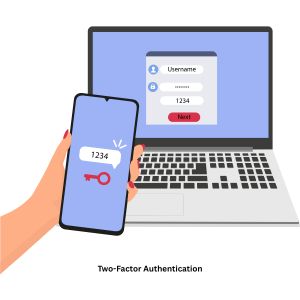
Even strong passwords can sometimes be stolen through phishing attacks or data breaches.
That’s why enabling Two-Factor Authentication (2FA) is highly recommended.
With 2FA enabled, logging in requires both your password and a second verification step, such as a code sent to your phone or generated by an authentication app.
Even if someone discovers your password, they won’t be able to access your account without the second verification code.
Many popular services, including Google, Microsoft, Facebook, and banking apps, support this extra layer of security.
5. Delete Old Accounts You No Longer Use
Over the years, most people create dozens of online accounts they eventually forget about. These old accounts may still contain personal information, including your email address, phone number, and payment details.
Unused accounts also increase your digital footprint and may become vulnerable if the website experiences a security breach.
Take some time to review your online accounts and permanently delete any that you no longer need. Reducing the number of active accounts also reduces your exposure to future data leaks.
6. Be Careful When Using Public Wi-Fi
Free Wi-Fi at airports, hotels, coffee shops, and shopping malls is convenient, but it isn’t always secure.
Public networks can make it easier for attackers to intercept internet traffic, especially if the network isn’t encrypted.
When using public Wi-Fi, avoid logging into online banking, shopping websites, or any service that contains sensitive personal information.
If you regularly use public networks, consider using a trusted Virtual Private Network (VPN). A VPN encrypts your internet traffic, making it much harder for others to monitor your online activity.
7. Keep Your Devices and Software Updated
Software updates aren’t just about adding new features. They often include important security patches that fix vulnerabilities discovered by developers.
Ignoring updates can leave your computer or smartphone exposed to known security risks.
Whenever possible, enable automatic updates for:
- Windows or macOS
- Android or iPhone
- Web browsers
- Antivirus software
- Mobile applications
Keeping your software updated is one of the simplest ways to improve your online security.
8. Check What Apps Can Access
Many mobile apps request permissions that aren’t necessary for their main purpose.
For example, a flashlight app probably doesn’t need access to your contacts or microphone.
Regularly review app permissions on your smartphone and remove access that isn’t required.
Pay particular attention to permissions involving:
- Location
- Camera
- Microphone
- Contacts
- Storage
- Calendar
Giving apps only the permissions they genuinely need helps protect your privacy.
9. Regularly Search for Yourself Online
One of the best ways to understand your digital footprint is to see what others can find about you.
Search your:
- Full name
- Email address
- Phone number
- Business name (if applicable)
You may discover old social media accounts, public profiles, outdated information, or websites that still display your personal details.
If you find information you no longer want to be public, you can often remove it by deleting old accounts or contacting the website owner.
Checking your online presence once or twice a year can help you stay aware of your digital footprint.
10. Stay Alert for Phishing Scams
Many cyberattacks don’t rely on hacking computers—they rely on tricking people.
Phishing emails, fake text messages, and fraudulent websites often look genuine. They may pretend to come from your bank, a delivery company, Microsoft, or another trusted organization.
Before clicking a link or downloading an attachment, verify that the message is legitimate.
Be especially cautious if the message:
- Creates a sense of urgency
- Asks for passwords
- Requests payment information
- Contains unexpected attachments
- Includes suspicious links
Taking a few extra seconds to verify a message can prevent serious security problems.
Additional Tips for Protecting Your Digital Footprint
The ten methods above cover the basics, but a few extra habits can improve your online privacy even further.
Clear your browser cookies and cache regularly if you don’t want websites tracking your browsing habits for extended periods.
Use secure websites that begin with HTTPS, especially when entering passwords or payment information.
Avoid oversharing your location in real time. Posting vacation photos after returning home is generally safer than announcing you’re away while your house is empty.
Finally, educate family members, especially children, about online privacy. A strong digital footprint starts with good internet habits.
Common Mistakes People Make
Many people unintentionally increase their digital footprint without realizing it.
Some common mistakes include:
- Using the same password everywhere
- Accepting every app permission request
- Leaving old social media accounts online
- Posting personal information publicly
- Ignoring software updates
- Clicking unknown links
- Using unsecured public Wi-Fi for sensitive activities
Avoiding these habits can significantly improve your online safety.
Final Thoughts
Your digital footprint is created every time you use the internet, but that doesn’t mean you have no control over it. Small changes in your online habits can make a big difference in protecting your privacy and personal information.
Simple actions like using strong passwords, enabling two-factor authentication, reviewing your privacy settings, deleting old accounts, and thinking carefully before sharing personal information can reduce your digital footprint and lower your risk of cyber threats.
The internet isn’t going away, and neither is your digital footprint. The key is to manage it wisely. By following these ten practical tips, you can enjoy the benefits of the online world while keeping your personal information better protected.
Suggestions
- What Is a Corrupted File?
- What Is a Digital Footprint?
- What Happens When Your C Drive Is Full?
- Windows 11 July 14 Patch Tuesday Update
- How to Add Password to a Folder
- DISM vs SFC vs CHKDSK
- Ransomware vs File Corruption
- Malware That Corrupts Files
- What Is Bit Rot? Understanding Silent Data Corruption