If you’ve ever looked at the specifications of a processor, you’ve probably noticed terms like L1 Cache, L2 Cache, or L3 Cache. Most people focus on the processor speed or the number of cores, but cache memory is just as important for overall computer performance.
Cache memory is one of the reasons modern computers feel fast. It helps the processor access frequently used data much more quickly than if it had to retrieve everything from RAM or your storage drive.
Although cache memory works behind the scenes, it plays a major role in how quickly programs open, games run, and files are processed.
In this guide, we’ll explain what cache memory is, how it works, the different types of CPU cache, and why it’s an important part of every computer.
What Is Cache Memory?
Cache memory is a small, ultra-fast memory located inside or very close to the CPU (Central Processing Unit). Its job is to temporarily store frequently used data and instructions so the processor can access them much faster than retrieving them from the computer’s main memory (RAM).
Think of cache memory as a shortcut.
Instead of searching through larger and slower memory every time the processor needs information, it first checks the cache. If the required data is already there, the processor can continue working almost instantly.
This saves time and allows your computer to perform tasks much more efficiently.
Although cache memory is much smaller than RAM, it is significantly faster.
A Simple Example to Understand Cache Memory
Imagine you’re studying for an exam.
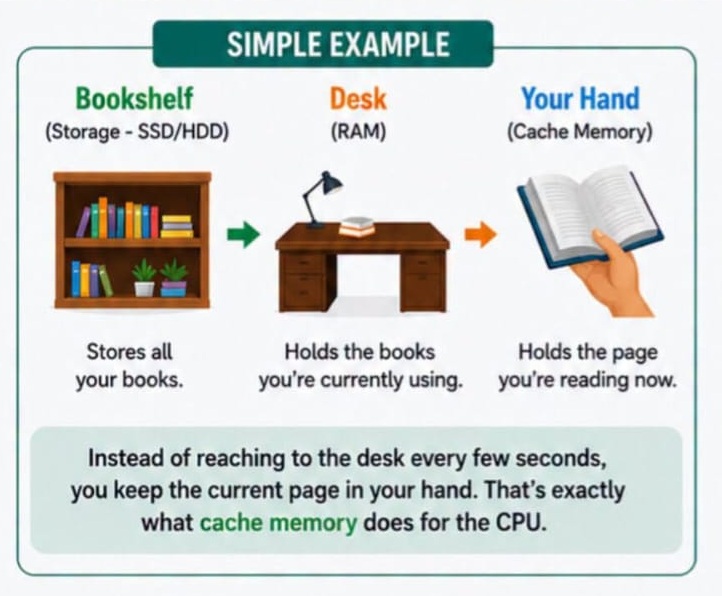
Your bookshelf contains all your textbooks. This is similar to your computer’s SSD or hard drive, where all your files are stored.
You place the books you’re currently using on your desk. Your desk represents RAM, where currently active programs and data are kept.
Now imagine you’re reading a page from one book. Instead of putting the book back on the desk after every sentence, you simply hold the current page open in your hand.
Your hand represents cache memory.
Since the page is already in your hand, you can read it instantly without reaching back to the desk every few seconds.
This is exactly how cache memory helps the processor. It keeps the information that is most likely to be used again immediately available.
How Does Cache Memory Work?
Every second, your processor performs billions of calculations.
During these calculations, it constantly needs access to instructions and data.
If the processor had to retrieve every piece of information directly from RAM, it would spend valuable time waiting.
Instead, the CPU first checks the cache memory.
If the required information is found there, it’s called a cache hit.
The processor immediately uses that data without waiting for RAM.
If the information isn’t available, it’s called a cache miss.
The processor then retrieves the data from RAM, uses it, and often stores a copy in the cache for future use.
This process happens automatically millions of times every second without you ever noticing.
Types of CPU Cache Memory
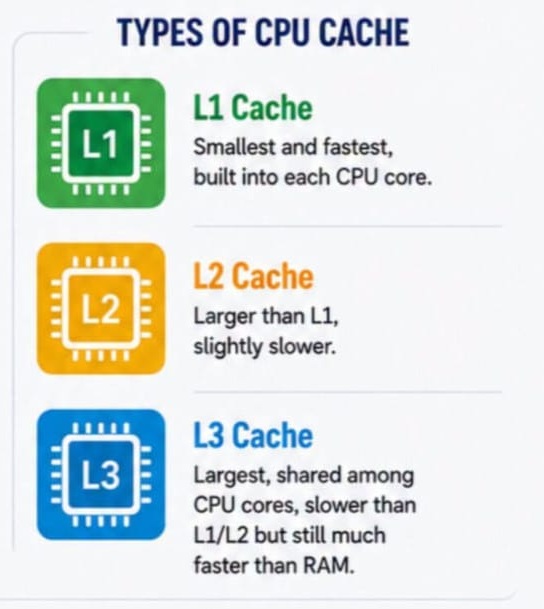
Modern processors usually contain three levels of cache memory.
Each level differs in size and speed.
L1 Cache
L1 (Level 1) Cache is the fastest cache memory available.
It is built directly into each CPU core and is extremely small compared to the other cache levels.
Because of its speed, the processor checks L1 cache first whenever it needs data.
Typical characteristics include:
- Fastest cache
- Smallest capacity
- Dedicated to each CPU core
- Used for the most frequently accessed instructions
Although its storage capacity is limited, L1 cache provides the quickest access times.
L2 Cache
L2 (Level 2) Cache is larger than L1 but slightly slower.
It still operates much faster than RAM and stores information that may not fit inside the L1 cache.
Many modern processors include dedicated L2 cache for each CPU core.
L2 cache provides a balance between storage size and speed.
L3 Cache
L3 (Level 3) Cache is the largest cache memory inside the processor.
Unlike L1 and L2, L3 cache is often shared among multiple CPU cores.
Although it is slower than L1 and L2 cache, it remains much faster than system RAM.
Its larger size allows multiple processor cores to access shared data efficiently.
Memory Speed Hierarchy
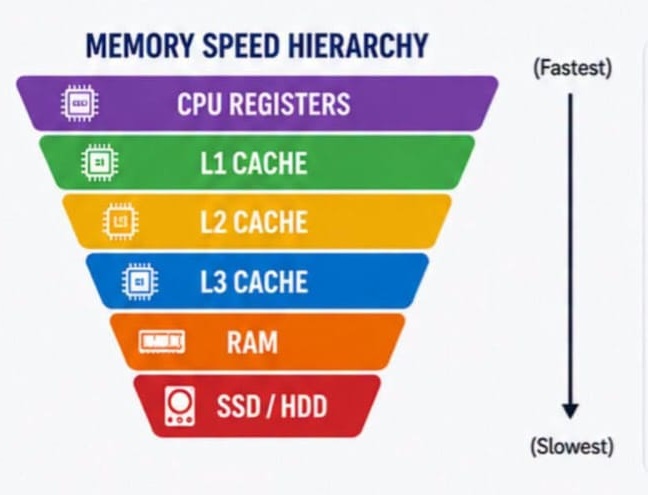
Computer memory is organized according to speed.
From fastest to slowest:
- CPU Registers
- L1 Cache
- L2 Cache
- L3 Cache
- RAM
- SSD
- Hard Drive (HDD)
The closer memory is to the processor, the faster it can be accessed.
This is why cache memory has such a significant impact on performance.
Why Is Cache Memory Important?
Although users rarely interact with cache memory directly, it improves nearly every task performed on a computer.
Faster Application Loading
Applications constantly reuse certain instructions.
Instead of repeatedly loading those instructions from RAM, cache memory stores them for immediate access.
This helps applications launch faster and respond more quickly.
Better Gaming Performance
Modern games perform millions of calculations every second.
Larger CPU cache helps the processor retrieve frequently used game data faster.
This can improve frame rates, reduce stuttering, and create smoother gameplay in CPU-intensive games.
Improved Multitasking
When several applications are running simultaneously, the processor constantly switches between tasks.
Cache memory allows the CPU to access recently used information much more quickly, making multitasking feel smoother.
Reduced Waiting Time
Without cache memory, processors would spend much of their time waiting for RAM.
Cache reduces this delay significantly.
The processor spends more time performing useful work and less time waiting for data.
Cache Memory vs RAM
Many people confuse cache memory with RAM because both temporarily store data.
However, they serve different purposes.
| Feature | Cache Memory | RAM |
|---|---|---|
| Location | Inside or very close to CPU | Installed on motherboard |
| Speed | Extremely fast | Fast, but slower than cache |
| Capacity | Small (KB or MB) | Much larger (GB) |
| Purpose | Stores frequently used CPU data | Stores active programs and files |
Both work together to improve system performance.
Cache Memory vs SSD
An SSD stores your operating system, applications, and personal files permanently.
Cache memory only stores temporary information while the processor is actively using it.
Once the computer shuts down, cache memory is cleared automatically.
Does More Cache Memory Mean Better Performance?
In many situations, yes.
Processors with larger cache memory often perform better in tasks that repeatedly access the same data.
These include:
- Gaming
- Video editing
- Programming
- 3D rendering
- Scientific computing
- Large spreadsheet calculations
However, cache size isn’t the only factor that determines processor performance.
Clock speed, architecture, number of cores, and software optimization also play important roles.
Can You Upgrade Cache Memory?
No.
Unlike RAM or storage, cache memory is built directly into the processor during manufacturing.
If you want a processor with more cache memory, you’ll need to upgrade the CPU itself.
Common Misconceptions About Cache Memory
Many people believe cache memory is simply another type of RAM.
That’s not true.
Cache memory is much smaller but significantly faster than RAM.
Another misconception is that more RAM automatically replaces the need for cache memory.
While adding RAM can improve multitasking, it cannot match the speed of cache memory because cache is located much closer to the processor.
Both components serve different purposes and work together to improve overall system performance.
Final Thoughts
Cache memory may be one of the smallest components inside your computer, but it has a huge impact on performance. By storing frequently used data close to the processor, it reduces waiting time and allows the CPU to work much more efficiently.
Whether you’re browsing the web, editing videos, playing games, or running professional software, cache memory helps your computer respond faster and operate more smoothly.
The next time you’re comparing processors, don’t just look at clock speed or core count. Paying attention to L1, L2, and L3 cache sizes can also give you a better idea of how a processor will perform in real-world tasks.
Suggestions
- What Is a Corrupted File?
- What Is a Digital Footprint?
- What Happens When Your C Drive Is Full?
- Windows 11 July 14 Patch Tuesday Update
- How to Add Password to a Folder
- DISM vs SFC vs CHKDSK
- Ransomware vs File Corruption
- Malware That Corrupts Files
- What Is Bit Rot? Understanding Silent Data Corruption