Every time you browse a website, send an email, transfer a file, or connect to a remote computer, your device uses network ports. These ports help computers know which application should receive incoming data. Without them, services like web browsing, online gaming, video conferencing, and email simply wouldn’t work.
If you’ve ever seen terms like Port 80, Port 443, or Port 22, this guide explains what they mean, why they matter, and where they are commonly used.
What Is a Network Port?
A network port is a virtual communication endpoint used by computers to exchange data over a network. Think of an IP address as the street address of a building and a port number as the apartment number inside that building. The IP address identifies the device, while the port tells the operating system which application or service should handle the incoming data.
Port numbers range from 0 to 65535 and are divided into three categories:
- Well-known ports (0–1023): Used by common internet services.
- Registered ports (1024–49151): Assigned to specific applications.
- Dynamic or private ports (49152–65535): Used temporarily by client applications.
Why Are Port Numbers Important?
Port numbers allow multiple services to run on the same device without interfering with one another. For example, your computer can browse websites, receive emails, and connect to cloud storage simultaneously because each service communicates through a different port.
They also help network administrators configure firewalls, troubleshoot connectivity issues, and secure systems by allowing or blocking specific services.
Common Network Ports Explained
HTTP – Port 80
Protocol: HTTP (Hypertext Transfer Protocol)
Port 80 is used for standard web traffic. When you visit a website that doesn’t use encryption, your browser communicates with the web server using HTTP.
Common Uses
- Browsing non-secure websites
- Internal web applications
- Testing web servers
HTTPS – Port 443
Protocol: HTTPS (Hypertext Transfer Protocol Secure)
Port 443 is the secure version of HTTP. It encrypts data exchanged between your browser and the website using SSL/TLS encryption.
Common Uses
- Secure websites
- Online banking
- E-commerce stores
- User logins
- Online payments
Today, almost every modern website uses HTTPS instead of HTTP.
FTP – Port 21
Protocol: File Transfer Protocol
FTP is one of the oldest methods for transferring files between computers. It allows users to upload and download files from a remote server.
Common Uses
- Website file uploads
- File sharing
- Server management
Because FTP sends data without encryption, many organizations now prefer more secure alternatives.
SFTP / SSH – Port 22
Protocol: Secure File Transfer Protocol / Secure Shell
Port 22 is used by SSH, which provides secure remote access to Linux and Unix servers. SFTP also uses this port to securely transfer files over an encrypted connection.
Common Uses
- Secure server login
- File transfers
- Website deployment
- Remote administration
SSH – Port 22
SSH encrypts all communication between the client and server, making it much safer than older remote access protocols.
Advantages
- Secure authentication
- Encrypted communication
- Remote command execution
- Server management
Telnet – Port 23
Telnet provides remote access to computers but does not encrypt data.
Because usernames and passwords are transmitted in plain text, Telnet is considered insecure and has largely been replaced by SSH.
SMTP – Port 25
Protocol: Simple Mail Transfer Protocol
SMTP is responsible for sending emails between mail servers.
Common Uses
- Outgoing email
- Mail server communication
- Email routing
Modern email providers often use secure SMTP ports like 465 or 587 for client email submission.
POP3 – Port 110
Protocol: Post Office Protocol Version 3
POP3 downloads emails from a mail server to your device. Once downloaded, messages are often removed from the server.
Best For
- Single-device email access
- Offline email reading
POP3S – Port 995
POP3S is the encrypted version of POP3.
It protects email communication using SSL/TLS encryption while keeping the same download-based email model.
IMAP – Port 143
Protocol: Internet Message Access Protocol
Unlike POP3, IMAP keeps emails on the server and synchronizes them across multiple devices.
Benefits
- Access email from multiple devices
- Folder synchronization
- Read/unread status sync
- Better collaboration
IMAPS – Port 993
IMAPS is the secure version of IMAP.
It encrypts all communication between your email client and the mail server, making it the preferred choice for modern email services.
DNS – Port 53
Protocol: Domain Name System
DNS converts domain names like example.com into IP addresses that computers can understand.
Without DNS, users would need to remember numerical IP addresses for every website they visit.
DHCP – Ports 67 and 68
Protocol: Dynamic Host Configuration Protocol
DHCP automatically assigns IP addresses to devices joining a network.
It Automatically Provides
- IP address
- Subnet mask
- Default gateway
- DNS server information
Most home routers use DHCP to configure connected devices automatically.
TFTP – Port 69
Protocol: Trivial File Transfer Protocol
TFTP is a simplified version of FTP used mainly for network devices.
Common Uses
- Router firmware updates
- Network booting
- Configuration backups
It offers no authentication or encryption, so it is rarely used on public networks.
SNMP – Port 161 (and Traps on Port 162)
Protocol: Simple Network Management Protocol
SNMP allows administrators to monitor and manage network devices such as routers, switches, printers, and servers.
Uses
- Device monitoring
- Performance tracking
- Network alerts
- Remote management
LDAP – Port 389
Protocol: Lightweight Directory Access Protocol
LDAP provides access to directory services that store user accounts, passwords, groups, and organizational information.
It is commonly used in corporate environments with Microsoft Active Directory and similar directory services.
RDP – Port 3389
Protocol: Remote Desktop Protocol
RDP allows users to remotely control Windows computers over a network.
Common Uses
- Remote work
- IT support
- Server administration
- Accessing office computers
Because RDP is frequently targeted by attackers, it should always be protected with strong passwords, multi-factor authentication, and, ideally, a VPN.
MySQL – Port 3306
Protocol: MySQL Database Server
This port is used by MySQL database servers to communicate with applications and database management tools.
Common Uses
- Web applications
- Content management systems
- E-commerce platforms
- Database administration
SMB/CIFS – Port 445
Protocol: Server Message Block
SMB allows computers to share files, folders, and printers across a network.
Common Uses
- Windows file sharing
- Shared folders
- Network-attached storage (NAS)
- Office file servers
TCP vs UDP Ports
Many of the ports above use either TCP, UDP, or both.
TCP
TCP provides reliable communication by ensuring every packet reaches its destination in the correct order.
Examples include:
- HTTP
- HTTPS
- FTP
- SSH
- SMTP
- IMAP
- POP3
- MySQL
UDP
UDP prioritizes speed over guaranteed delivery, making it suitable for services where low latency is important.
Examples include:
- DNS
- DHCP
- TFTP
- SNMP
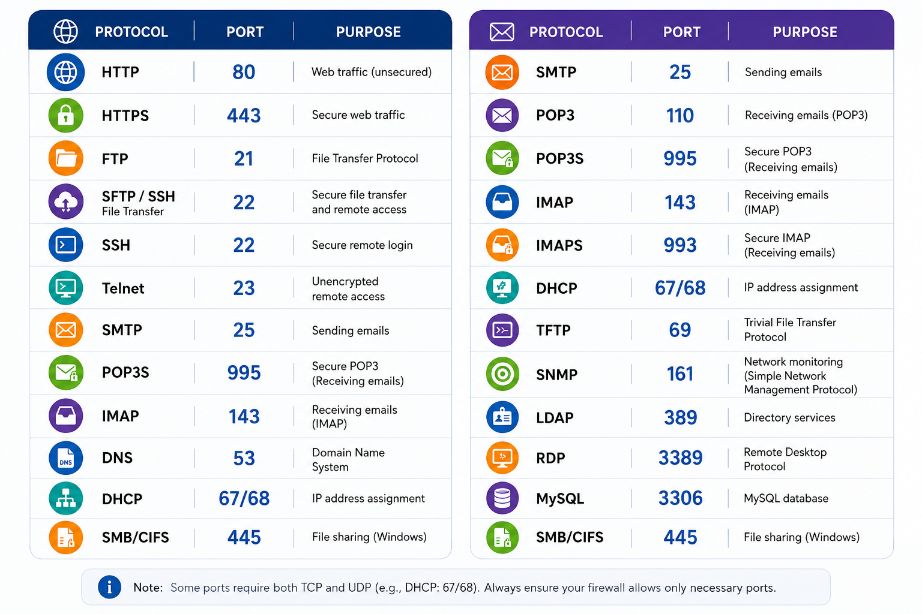
Common Network Ports at a Glance
| Service | Default Port |
|---|---|
| HTTP | 80 |
| HTTPS | 443 |
| FTP | 21 |
| SSH / SFTP | 22 |
| Telnet | 23 |
| SMTP | 25 |
| POP3 | 110 |
| POP3S | 995 |
| IMAP | 143 |
| IMAPS | 993 |
| DNS | 53 |
| DHCP | 67/68 |
| TFTP | 69 |
| SNMP | 161 |
| LDAP | 389 |
| RDP | 3389 |
| MySQL | 3306 |
| SMB/CIFS | 445 |
Security Tips for Network Ports
Open ports are necessary for network communication, but every open port can also become a potential entry point if it isn’t properly secured. Follow these best practices:
- Close ports that aren’t being used.
- Enable a firewall to control incoming and outgoing traffic.
- Use encrypted protocols such as HTTPS, SSH, IMAPS, and SFTP instead of older, unencrypted alternatives.
- Keep servers and network devices updated with the latest security patches.
- Regularly scan your network for unnecessary open ports.
Final Thoughts
Network ports are one of the building blocks of modern networking. They allow different services to communicate over the same internet connection while keeping traffic organized. Whether you’re managing a website, configuring a router, troubleshooting a connection, or preparing for a networking certification, understanding common port numbers will help you work more confidently with computer networks.