Every device that connects to a network has an identity. While most people are familiar with IP addresses, there’s another identifier working quietly in the background: the MAC address.
A MAC address plays an essential role in helping devices communicate over local networks. Whether you’re connecting a laptop to Wi-Fi, setting up a printer, or troubleshooting network issues, understanding MAC addresses can make networking much easier.
In this guide, you’ll learn what a MAC address is, how it works, where it’s used, how it’s different from an IP address, and how to find the MAC address on your device.
What Is a MAC Address?
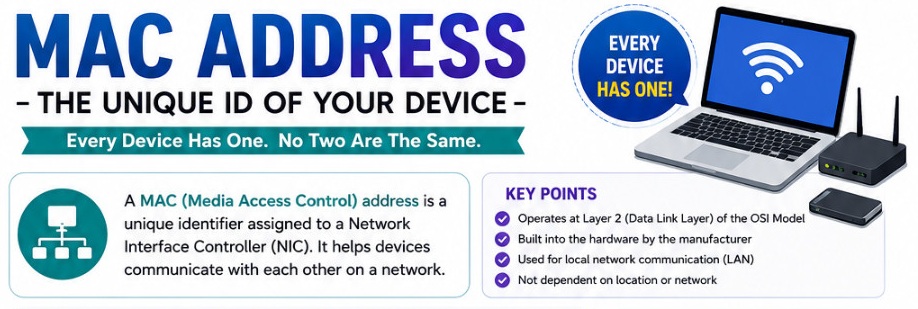
A MAC (Media Access Control) address is a unique hardware identifier assigned to a network interface, such as an Ethernet or Wi-Fi adapter.
Unlike an IP address, which can change depending on the network you’re connected to, a MAC address is usually assigned by the manufacturer and is intended to remain the same throughout the device’s lifetime.
Think of it like this:
- MAC address: Your device’s permanent identity on a local network.
- IP address: Your device’s temporary location or address on a network.
Every network-enabled device has at least one MAC address. Devices with both Ethernet and Wi-Fi usually have two different MAC addresses—one for each network adapter.
What Does a MAC Address Look Like?
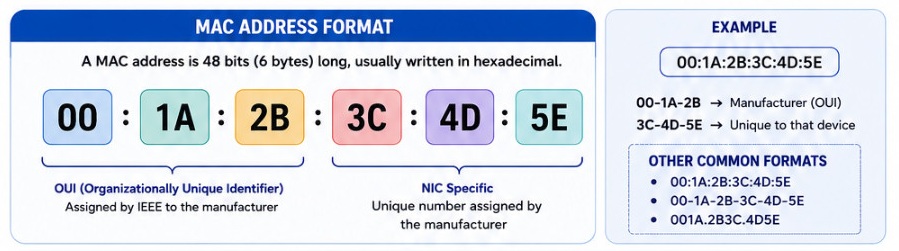
A MAC address consists of 48 bits, typically displayed as six groups of two hexadecimal characters.
Examples:
00:1A:2B:3C:4D:5Eor
00-1A-2B-3C-4D-5EEach pair contains numbers (0-9) and letters (A-F).
Some systems display MAC addresses without separators:
001A2B3C4D5EAll three formats represent the same type of identifier.
How Does a MAC Address Work?
When devices communicate within the same local network, they use MAC addresses to send data directly to one another.
Here’s a simplified process:
- Your computer wants to send data to another device.
- It first determines the destination IP address.
- The network uses a protocol called ARP (Address Resolution Protocol) to find the matching MAC address.
- The data packet is then delivered using that MAC address.
In simple terms, the IP address helps locate the destination, while the MAC address ensures the data reaches the correct network interface.
Why Is a MAC Address Important?
Although users rarely interact with MAC addresses directly, they are fundamental to networking.
Some common uses include:
Device Identification
Routers can distinguish every connected device by its MAC address, even if multiple devices have similar names.
Network Security
Many routers allow administrators to permit or block devices based on their MAC addresses through MAC filtering.
DHCP Reservations
A router can assign the same IP address to a specific device every time it connects by recognizing its MAC address.
Troubleshooting
Network administrators often use MAC addresses to identify devices causing connection problems or network conflicts.
Inventory Management
Businesses use MAC addresses to track computers, printers, security cameras, and other network hardware.
Structure of a MAC Address
A MAC address has two main parts.
Organizationally Unique Identifier (OUI)
The first three pairs identify the manufacturer.
For example, companies like Intel, Dell, Apple, Cisco, and HP each have registered prefixes.
Device Identifier
The remaining three pairs uniquely identify the individual network interface produced by that manufacturer.
This combination helps ensure every device receives a unique address.
MAC Address vs IP Address
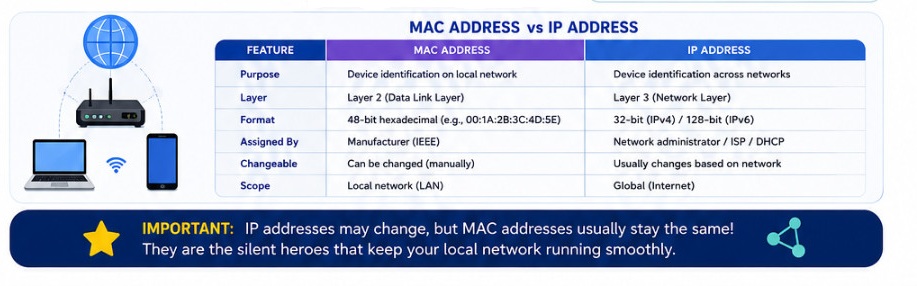
Although both identify devices, they serve different purposes.
| Feature | MAC Address | IP Address |
|---|---|---|
| Purpose | Identifies network hardware | Identifies network location |
| Assigned By | Device manufacturer | Router or ISP |
| Can Change | Usually No | Yes |
| Used On | Local network | Local and Internet |
| Format | Hexadecimal | IPv4 or IPv6 |
A simple analogy:
- MAC address = Your fingerprint
- IP address = Your home address
Your fingerprint stays the same, while your home address can change if you move.
Is a MAC Address Truly Permanent?
Traditionally, MAC addresses were permanently stored in the network hardware.
Today, things are slightly different.
Modern operating systems can use MAC randomization, which temporarily changes the MAC address while connecting to Wi-Fi networks.
This improves privacy because public Wi-Fi hotspots cannot easily track a device across multiple visits.
However, the original hardware MAC address still exists and can usually be viewed in system settings.
Can Two Devices Have the Same MAC Address?
Under normal circumstances, no.
Manufacturers are responsible for assigning unique MAC addresses to each network interface.
However, duplicate MAC addresses can occur if:
- Someone manually changes a MAC address (MAC spoofing)
- Hardware is improperly cloned
- Virtual machines are configured with identical MAC addresses
Duplicate MAC addresses on the same network can cause communication issues.
What Is MAC Address Spoofing?
MAC spoofing is the process of changing the reported MAC address of a network adapter.
People use MAC spoofing for several reasons:
- Privacy protection
- Network testing
- Bypassing MAC-based restrictions
- Software development and debugging
While MAC spoofing has legitimate uses, it can also be misused to bypass network security policies.
How to Find Your MAC Address
Finding your MAC address is straightforward on most devices.
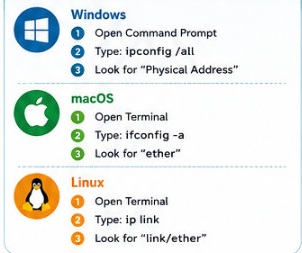
On Windows
- Press Windows + R.
- Type cmd and press Enter.
- Run:
ipconfig /allLook for Physical Address under the active network adapter.
Alternatively:
- Open Settings
- Go to Network & Internet
- Select your connection
- Open Hardware properties
Your MAC address will be listed there.
On macOS
- Open System Settings.
- Select Network.
- Choose Wi-Fi or Ethernet.
- Click Details.
- View the MAC Address or Hardware Address.
You can also use Terminal:
ifconfigOn Linux
Open Terminal and run:
ip linkor
ifconfigThe MAC address appears next to the network interface.
On Android
- Open Settings.
- Tap About Phone.
- Select Status.
- Open Wi-Fi MAC Address.
The exact location may vary depending on the manufacturer.
On iPhone
- Open Settings.
- Tap General.
- Select About.
- Scroll to Wi-Fi Address.
This is your device’s MAC address.
Can You Change a MAC Address?
Yes.
Most operating systems allow users to temporarily modify or “spoof” the MAC address through software.
Once the device restarts or the settings are reverted, the original hardware MAC address usually returns unless the change is configured to persist.
Is It Safe to Share Your MAC Address?
Generally, sharing a MAC address is less risky than exposing sensitive personal information, but it’s still good practice to keep it private.
A MAC address can sometimes be used to:
- Identify a device on a local network
- Configure router access
- Troubleshoot connectivity
- Manage enterprise networks
Avoid posting your MAC address publicly unless it’s necessary for technical support or network administration.
Common Myths About MAC Addresses
A MAC Address Identifies You on the Internet
False.
MAC addresses are only used within local networks. They are not transmitted across the Internet by routers.
Every Device Has Only One MAC Address
Not always.
Devices with multiple network interfaces often have separate MAC addresses for Wi-Fi, Ethernet, Bluetooth, and other adapters.
MAC Filtering Is Complete Security
No.
MAC filtering adds a basic layer of access control, but it can be bypassed through MAC spoofing. Strong Wi-Fi encryption and secure passwords remain far more effective.
Frequently Asked Questions
What does MAC stand for?
MAC stands for Media Access Control.
Is a MAC address the same as an IP address?
No. A MAC address identifies the physical network interface, while an IP address identifies a device’s location on a network.
Does changing Wi-Fi change my MAC address?
Normally, no. However, some devices use MAC randomization, which presents a temporary MAC address to Wi-Fi networks for improved privacy.
Can a router see my MAC address?
Yes. Every router can see the MAC addresses of devices directly connected to its local network.
Can websites see my MAC address?
No. Websites on the Internet cannot view your MAC address because routers do not forward MAC addresses beyond the local network.
Final Thoughts
A MAC address is one of the core building blocks of computer networking. It provides a unique identity for every network interface, allowing devices to communicate reliably within local networks.
Although most users never need to work with MAC addresses directly, understanding what they are can help when configuring routers, troubleshooting network problems, managing connected devices, or improving network security.
The next time you connect your laptop, smartphone, or smart TV to a network, remember that its MAC address is working behind the scenes to ensure data reaches the correct device quickly and accurately.