When you format a hard drive, SSD, USB flash drive, or memory card, you’re usually asked to choose a file system. Two of the most common options are NTFS and FAT32.
At first glance, they might seem like technical terms that only computer experts need to understand. In reality, the file system you choose can affect how safely your files are stored, how large your files can be, and even how likely you are to lose data if something goes wrong.
If you’re wondering which file system is more reliable, the short answer is NTFS. However, FAT32 still has its place, especially when compatibility with older devices is important.
Let’s look at both file systems in simple language and understand which one is the better choice for reliability.
What Is a File System?
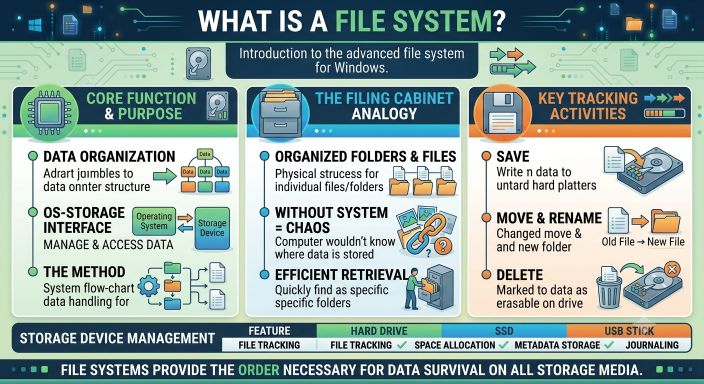
A file system is the method your operating system uses to organize and manage data on a storage device.
Think of it as a filing cabinet.
Without a filing system, your computer wouldn’t know where your photos, videos, documents, or applications are stored.
Every time you save, move, rename, or delete a file, the file system keeps track of that information.
What Is FAT32?
FAT32 stands for File Allocation Table 32. It was introduced by Microsoft in the 1990s and quickly became one of the most widely used file systems.
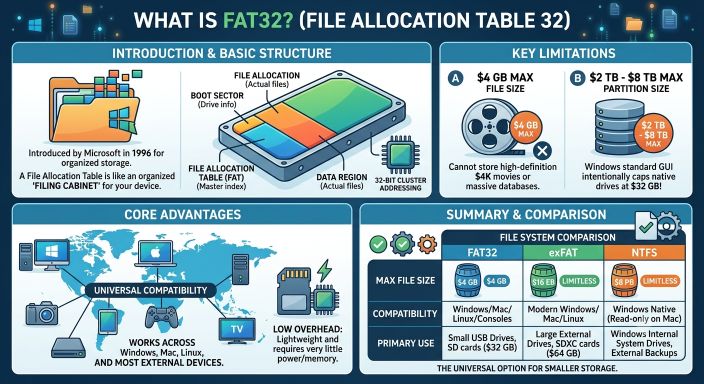
Even today, FAT32 is supported by almost every operating system and many electronic devices, including:
- Windows
- macOS
- Linux
- Smart TVs
- Digital cameras
- Game consoles
- Car entertainment systems
- USB flash drives
Its biggest strength is compatibility.
If you need a USB drive that works almost everywhere, FAT32 is often the safest choice.
What Is NTFS?
NTFS stands for New Technology File System. It became the default file system for modern versions of Windows and was designed to overcome many of FAT32’s limitations.
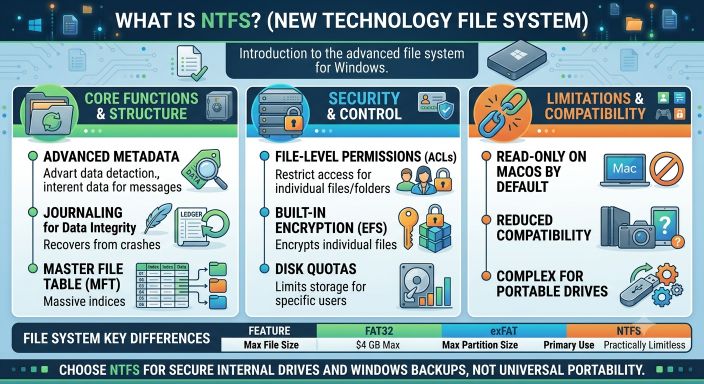
NTFS is built with reliability, security, and performance in mind.
It supports large files, large storage devices, permissions, encryption, compression, and advanced recovery features that FAT32 simply doesn’t have.
For internal hard drives and SSDs running Windows, NTFS is the standard choice.
NTFS vs FAT32: Reliability Comparison
When people ask which file system is more reliable, they’re really asking one important question:
Which one is less likely to lose my data if something goes wrong?
In most situations, NTFS is the clear winner.
Let’s look at why.
1. Protection Against Data Corruption
One of NTFS’s biggest advantages is its ability to reduce the risk of file corruption.
It uses a feature called journaling.
Before making important changes to files, NTFS records those changes in a special log. If the computer suddenly loses power or crashes, Windows can use this log to recover the file system and reduce damage.
FAT32 does not have journaling.
If power is lost while files are being written, the chance of corruption is much higher.
Winner: NTFS
2. Better Recovery After a Crash
Imagine you’re copying hundreds of photos to an external drive when your computer suddenly shuts down.
With FAT32, there’s a greater chance that some files—or even the entire file system—will become corrupted.
NTFS is much better at recovering from unexpected shutdowns because it keeps track of recent operations.
While no file system can guarantee zero data loss, NTFS provides much stronger protection.
Winner: NTFS
3. Support for Large Files
One of FAT32’s biggest limitations is its maximum file size.
A single FAT32 file cannot be larger than 4 GB.
That isn’t a problem for documents or photos, but it becomes a serious limitation when working with:
- HD movies
- 4K videos
- Game files
- Virtual machines
- Backup images
NTFS supports files that are far larger than most users will ever need.
Winner: NTFS
4. Storage Capacity
FAT32 also has limits on partition size, while NTFS is designed for today’s large hard drives and SSDs.
If you’re using modern storage devices with hundreds of gigabytes or several terabytes of capacity, NTFS handles them much more efficiently.
Winner: NTFS
5. Security Features
FAT32 has almost no built-in security.
Anyone who connects the drive can usually access its contents.
NTFS supports features such as:
- File permissions
- User access control
- Encryption
- Compression
- Disk quotas
These features make NTFS much more suitable for personal and business computers.
Winner: NTFS
6. Compatibility
This is where FAT32 still shines.
Almost every operating system and device can read FAT32.
Many cameras, printers, gaming consoles, routers, and media players expect USB drives to be formatted as FAT32.
NTFS works perfectly with Windows but has limited write support on some devices unless additional software is installed.
If you frequently move files between different types of devices, FAT32 may still be the better choice.
Winner: FAT32
NTFS vs FAT32 Quick Comparison
| Feature | NTFS | FAT32 |
|---|---|---|
| Reliability | ⭐⭐⭐⭐⭐ | ⭐⭐⭐ |
| Journaling | Yes | No |
| Maximum File Size | Very Large | 4 GB |
| Crash Recovery | Excellent | Limited |
| Security Features | Yes | No |
| Windows Support | Excellent | Excellent |
| Device Compatibility | Good | Excellent |
Which File System Is Better for USB Drives?
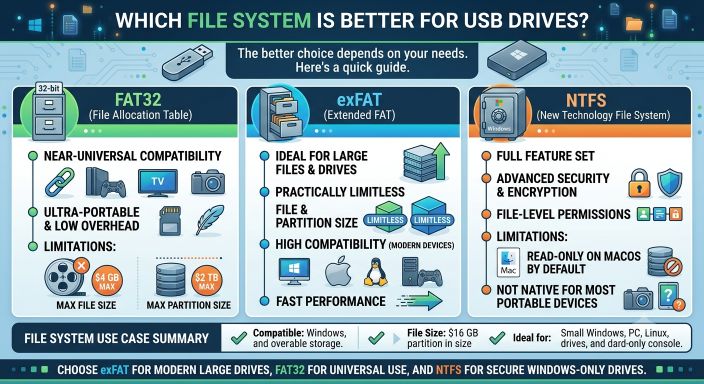
It depends on how you use the drive.
Choose FAT32 if:
- You need maximum compatibility.
- The drive will be used with TVs, cameras, or gaming consoles.
- You mostly store small files.
Choose NTFS if:
- You use Windows.
- You store large videos or backups.
- Data safety is more important than compatibility.
- You regularly transfer files larger than 4 GB.
Can the File System Affect File Corruption?
Yes.
Although hardware problems are still the most common cause of file corruption, the file system also plays an important role.
A modern file system like NTFS is designed to reduce damage during unexpected shutdowns and system crashes.
FAT32 lacks many of these protections.
This doesn’t mean NTFS is immune to corruption. Power failures, failing storage devices, malware, and bad sectors can still damage files regardless of the file system.
However, NTFS generally provides better protection against these situations.
Can You Convert FAT32 to NTFS?
Yes.
Windows allows you to convert a FAT32 drive to NTFS without deleting your files.
Even so, it’s always a good idea to back up important data before making changes to a file system.
A backup protects you in case something unexpected happens during the conversion.
Which One Should You Choose?
For most Windows users, NTFS is the better option.
It offers stronger protection against corruption, supports larger files, includes security features, and performs better on modern storage devices.
FAT32 still has value when compatibility is the highest priority, especially for USB drives used with multiple devices.
If you’re setting up an internal drive, storing important documents, or creating backups, NTFS is almost always the smarter choice.
Final Thoughts
Choosing the right file system isn’t just about compatibility—it’s also about protecting your data.
FAT32 has earned its reputation because it works with almost every device, but it was designed decades ago and lacks many of the reliability features found in modern file systems.
NTFS was built with today’s computers in mind. Its journaling system, better recovery capabilities, support for large files, and security features make it the more reliable option for everyday use.
If protecting your files is your priority, NTFS is the file system you can trust.
Suggestions
- What Is a Corrupted File?
- What Is a Binary File?
- How Videos Become Corrupted
- Why JPEG Images Become Corrupted
- Recovering Corrupted Photos
- ZIP File Corruption Explained
- How to Fix a Corrupted File
- Corrupt Any File Tool
- Corrupt PDF Tool
- Corrupt Image Tool
Frequently Asked Questions
Is NTFS more reliable than FAT32?
Yes. NTFS includes journaling and recovery features that help reduce the risk of file corruption after unexpected shutdowns or system crashes.
Why is FAT32 still used?
FAT32 remains popular because it is compatible with a wide range of operating systems, cameras, TVs, game consoles, and other devices.
Can FAT32 store large video files?
No. FAT32 has a maximum file size limit of 4 GB. Larger files require a different file system, such as NTFS.
Does NTFS completely prevent file corruption?
No. Storage failures, malware, bad sectors, and power loss can still cause corruption. However, NTFS is better equipped to recover from many common problems than FAT32.