Videos capture some of our most valuable memories, from family events and vacations to business presentations and creative projects. But few things are more frustrating than clicking on a video only to find that it won’t play, freezes halfway through, or displays an error message.
Video corruption is a common problem that can affect anyone. The good news is that understanding why it happens can help you prevent it and, in some cases, recover your files.
In this guide, we’ll explain how videos become corrupted, what happens when corruption occurs, whether damaged videos can be repaired, and how you can intentionally corrupt a video for software testing.
What Is a Corrupted Video?
A corrupted video is a video file that has been damaged, making it difficult or impossible for media players to read correctly.
The corruption may affect the entire file or only a small portion of it. Sometimes the video won’t open at all, while other times it may play with glitches, missing frames, or no sound.
Video corruption can happen to many popular formats, including:
- MP4
- MOV
- AVI
- MKV
- WMV
- WebM
How Does a Video Become Corrupted?
There are several reasons why a video file may become damaged.
1. Interrupted File Transfer
Copying a video from a camera, smartphone, USB drive, or memory card takes time.
If the transfer is interrupted because the cable is disconnected or the storage device is removed too early, the copied video may be incomplete and become corrupted.
2. Sudden Power Failure
If your computer or camera loses power while recording, saving, or editing a video, the file may not be written correctly.
Many video formats save important information only after recording finishes. If the recording stops unexpectedly, the file may be unreadable.
3. Damaged Memory Cards
SD cards and microSD cards wear out over time.
If bad sectors develop on the card, parts of the video file may become unreadable, causing playback problems or complete corruption.
4. Hard Drive or SSD Problems
Storage devices can fail because of age, physical damage, or manufacturing defects.
When a video is stored in damaged sectors, some of its data may be lost.
5. Virus or Malware
Malware can modify, encrypt, or delete video files.
Although this is less common than storage-related corruption, it can make videos impossible to open.
6. Software Crashes
If video editing software crashes while exporting or saving a project, the resulting video may be incomplete or corrupted.
7. Download Errors
Videos downloaded from the internet can become corrupted if the download is interrupted before completion.
The file may appear to download successfully but still contain missing data.
What Happens When a Video Is Corrupted?
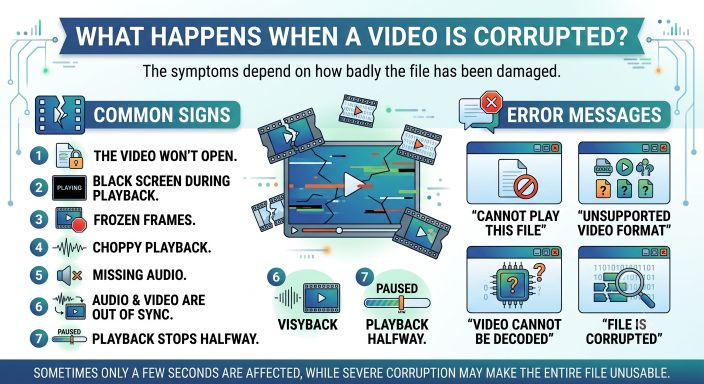
The symptoms depend on how badly the file has been damaged.
Common signs include:
- The video won’t open.
- Black screen during playback.
- Frozen frames.
- Choppy playback.
- Missing audio.
- Audio and video are out of sync.
- Playback stops halfway.
- Error messages such as:
- “Cannot play this file”
- “Unsupported video format”
- “Video cannot be decoded”
- “File is corrupted”
Sometimes only a few seconds of the video are affected, while severe corruption may make the entire file unusable.
Can a Corrupted Video Be Repaired?
Yes, in many cases.
Whether a video can be repaired depends on several factors:
- How much of the file is damaged.
- Whether the video header is intact.
- If important metadata is still available.
- Whether the original video data still exists.
If only the video header or index is damaged, repair software can often rebuild it.
If large portions of the actual video data are missing, complete recovery may not be possible. However, some tools can still recover playable sections of the video.
If you have a backup copy, restoring it is usually the fastest and most reliable solution.
How to Reduce the Risk of Video Corruption
A few simple habits can help protect your videos.
- Safely eject USB drives and memory cards.
- Avoid removing storage devices while files are being copied.
- Keep backups of important videos.
- Replace old or unreliable SD cards.
- Use a reliable power source when recording or editing.
- Keep your computer protected with updated antivirus software.
- Regularly check your storage devices for errors.
Can You Deliberately Corrupt a Video?
Yes.
There are situations where intentionally corrupting a video is useful.
Software developers, QA engineers, cybersecurity professionals, students, and IT administrators often need damaged video files to test how applications handle corrupted data.
For example, you might want to test:
- Video recovery software
- Media players
- Cloud storage platforms
- Backup systems
- File upload validation
- Error handling in applications
Instead of damaging an important video manually, you can create a corrupted copy while keeping the original file safe.
You can use our online MP4 corruption tool to intentionally corrupt a copy of your video for testing purposes:
The tool modifies only the copy you choose to upload, allowing you to simulate real-world corruption without risking your original file.
When Should You Intentionally Corrupt a Video?
Creating a corrupted video is useful when you want to:
- Test video repair software.
- Verify backup and recovery systems.
- Train students in digital forensics.
- Test media player error handling.
- Validate upload restrictions.
- Simulate real-world file corruption.
Using a dedicated corruption tool is much safer than editing the file manually with a hex editor, especially if you’re not familiar with file structures.
Conclusion
Video corruption can happen because of interrupted file transfers, failing storage devices, software crashes, malware, or unexpected power loss. Depending on the extent of the damage, some videos can be repaired using specialized recovery tools.
The best way to protect your videos is to maintain regular backups, use reliable storage devices, and avoid interrupting file transfers.
If you’re testing software or learning about file recovery, intentionally creating a corrupted video can be useful. Using a dedicated corruption tool lets you safely generate damaged test files while keeping your original videos untouched.
Suggestions
- What Is a Corrupted File?
- What Is a Binary File?
- Why JPEG Images Become Corrupted
- Recovering Corrupted Photos
- ZIP File Corruption Explained
- How to Fix a Corrupted File
- Corrupt Any File Tool
- Corrupt PDF Tool
- Corrupt Image Tool
Frequently Asked Questions (FAQ)
Why won’t my video play?
The video may be corrupted, incomplete, or stored on a damaged storage device. It could also be using an unsupported codec or file format.
Can corrupted videos be repaired?
Yes. Many corrupted videos can be repaired if the damage is limited to the file header or metadata. Severe corruption may only allow partial recovery.
What causes video corruption?
Common causes include interrupted file transfers, power failures, damaged storage devices, malware, software crashes, and incomplete downloads.
Can I intentionally corrupt a video?
Yes. Intentionally corrupted videos are commonly used for testing media players, backup systems, recovery software, and application error handling. Using a dedicated corruption tool is the safest way to create them.